

AnyROR Gujarat 2026 — Official Guide to 7/12 Utara, Rural Land Records & VF-6, 8A & Property Card Online.
If you own land in Gujarat — even just a small plot — there will be a moment when you need your 7/12 Utara. Fast. Maybe your bank asked for it before approving your loan. Maybe a buyer wants to see it before the deal moves forward. Maybe there is a court case and your lawyer needs it today.
That one document can stop everything.
Before AnyROR existed, you had no choice. You traveled to the Taluka office, waited in long lines, dealt with clerks, paid someone to “help” you — and still went home without the paper. Days wasted. Money spent. Stress for nothing.
Now? You open your phone, go to the AnyROR portal, type a few details, and your land record is right there on your screen — in about three minutes. No office visit. No middleman. No fee.
AnyROR Gujarat solves this problem completely. And this guide will show you exactly how to use it — step by step — so you can check any land record on your own, any time you need it. What AnyROR is, how the portal works, how to check every type of record, and what each document actually means for you.
What Is AnyRoR Gujarat?
AnyROR means Any Record of Rights. It is the official online land records portal of the Revenue Department, Government of Gujarat. The official website is anyror.gujarat.gov.in — also called iORA (Integrated Online Revenue Application) or e-Dhara.
Through this single portal, any person can check complete land ownership details, mutation history, crop records, survey numbers, and property information for every district in Gujarat — completely free of charge, 24 hours a day.
The portal covers:
- All 33 districts of Gujarat
- Over 18,000 villages (rural records)
- Every registered urban property across Gujarat’s cities
- Both agricultural land (7/12 Utara, VF-6, VF-8A) and city properties (Property Card)
You do not need an account or login for basic record viewing. Whatever the Talati sees in his office is exactly what you see on your screen.
| Detail | Information |
|---|---|
| Full Form | Any Record of Rights |
| Managed By | Revenue Department, Government of Gujarat |
| Official Website | anyror.gujarat.gov.in |
| Also Known As | iORA, e-Dhara, Bhulekh Gujarat |
| Districts Covered | All 33 districts of Gujarat |
| Villages Covered | 18,000+ villages |
| Availability | 24 hours, 7 days a week |
| Cost | Completely free |
| Login Required | No — for basic record viewing |
| Legally Valid Copy | Digitally Signed RoR — yes |
AnyROR@Anywhere — Access from Any Device, Anywhere
The portal is officially promoted as AnyROR@Anywhere — meaning you can access any land record from anywhere in Gujarat (or the world) using any device with internet access.
You do not need the AnyROR app for this. The portal works directly on Chrome on your phone or laptop. Just go to anyror.gujarat.gov.in and you are set.
In real use, most people access it on mobile. The site loads reasonably well on a basic smartphone connection. If it ever feels slow, try clearing your browser cache or using a fresh incognito tab.
Who Uses AnyROR Gujarat?
AnyROR is not just for farmers. In real use, all kinds of people need it regularly:
Farmers need the 7/12 Utara (Satbara Utara) for crop loans, Kisan Credit Card applications, PM Fasal Bima Yojana insurance claims, and government subsidy schemes. Banks require it before processing any agricultural loan.
Property buyers should check AnyROR before paying any token money. It tells you who actually owns the land, whether there is an active mortgage or encumbrance, and whether the mutation history is clean. Three minutes of checking can save years of legal trouble.
NRIs and absentee owners use it to monitor their properties remotely. Property fraud — especially through misuse of Power of Attorney — is real. Checking your record regularly from anywhere in the world takes two minutes.
Families handling inheritance need to verify ancestral land records, check khatedaar names, and confirm that property is still registered correctly in the family name.
Lawyers and legal professionals use AnyROR to pull VF-6 mutation entries, 135-D notices, and revenue case details without visiting the Taluka office every time.
All Land Records Available on AnyRoR Gujarat
The portal gives you access to a wide range of official documents. Here is what each one is:
| Record Name | Gujarati Term | What It Shows | When You Need It |
|---|---|---|---|
| 7/12 Utara (Satbara) | સાત બાર ઉતારો | Ownership, crop details, land type, loan status | Farm loans, ownership proof, agriculture subsidies |
| VF-6 Entry Details | હક્ક પત્રક | Mutation entries — changes in ownership | When land is sold, inherited, or gifted |
| VF-7 Survey Details | સર્વે નંબર વિગત | Survey number-wise land information | To verify land boundaries and area |
| VF-8A Khata | ખાતા વિગત | Total landholding under one account | Checking combined land under one owner |
| 135-D Notice | ૧૩૫-ડ નોટિસ | Public notice before mutation approval | To check or object during a mutation process |
| Property Card | મિલ્કત કાર્ડ | Urban property ownership, boundaries, area | City property transactions, loans |
| Digitally Signed RoR | ડિજિટલી સાઇન્ડ ગામ નમૂના | Legally certified land record copy | Bank loans, court cases, property registration |
| e-Chavdi | ઈ-ચાવડી | Village-level land and administrative records | Village-level land administration |
| Revenue Case Details | આવક કેસ વિગત | Land dispute and revenue case information | Legal disputes, court proceedings |
| Old Scanned Records | જૂના સ્કેન રેકર્ડ | Archived old land records (PDF format) | Ancestral land verification, legacy records |
Step-by-Step: How to Check Rural Land Records (7/12, VF-6, VF-8A)
Checking land records online in Gujarat is simple when you follow the correct steps. Through the official AnyRoR Gujarat portal, users can easily access rural land records such as 7/12 Utara, VF-6 mutation entries, and VF-8A Khata details. The portal also allows you to view urban property cards, download digitally signed Record of Rights (RoR), search property registration details, and verify ownership information online.
Below is a complete step-by-step guide based on your screenshots to help you check all records easily.
How to Check Rural Land Records
- Follow these steps to check any rural land record on AnyRoR Gujarat:
- Step 1: Open your browser and go to anyror.gujarat.gov.in
- Step 2: On the homepage, click “View Land Record – Rural”
- Step 3: From the dropdown menu, select the type of record you want:

- VF-7/12 (for 7/12 Utara)
- VF-6 Entry Details (for mutation entries)
- VF-8A (for Khata/account details)
- 135-D Notice Details (for mutation notices)
- Revenue Case Details (for disputes)
- Old Scanned VF-7/12 (for archived records)
- Step 4: Select your District, Taluka, and Village from the dropdown menus
- Step 5: Enter the Survey Number or Khata Number or Owner Name (depending on which search option you choose)
- Step 6: Complete the Captcha verification
- Step 7: Click “Get Record Detail”.

Your record will appear on screen. You can read it online or take a printout for reference.
Important note: The online record is for informational purposes. If you need a legally valid copy for a bank or court, download the Digitally Signed RoR — that is the official certified version.
For a complete overview of how to check rural land records such as 7/12 Utara, VF‑6, VF‑8A and more on AnyRoR Gujarat, check our AnyRoR Rural Land Record Guide.
Step-by-Step: How to Check Urban Property Card
- For city properties in Ahmedabad, Surat, Vadodara, Rajkot, Gandhinagar, or any other urban area in Gujarat, you need the Property Card — not the 7/12 Utara. Here is how to get it:
- Step 1: Visit anyror.gujarat.gov.in
- Step 2: Click “View Land Record – Urban” on the homepage

- Step 3: Select your search option:
- Property Card
- Unit Property Card
- Survey No. Details
- Nondh No. Details
- 135-D Notice Details
- Step 4: Choose your District and City Survey Office
- Step 5: Select the Ward and enter the Survey Number, Sheet Number, and Card Number
- Step 6: Enter the Captcha and click “Get Record Detail”

The property card shows the official ownership details, land area in square meters, and boundary information for your urban property.
This is especially useful if you are buying a flat or plot in a Gujarat city and want to verify the seller’s ownership before paying any advance
If you want to check urban property ownership, survey details, and property boundaries, use the E‑Milkat search on the AnyRoR portal. Learn more in our detailed E‑Milkat guide.
How to Download a Digitally Signed RoR (Legally Valid Copy)
The online land records you see on the portal are for viewing only. If you need a copy that is accepted by banks, courts, or government departments, you need a Digitally Signed RoR. This is an officially certified, tamper-proof document issued by the Gujarat Revenue Department.
Here is how to download it:
- Step 1: Go to anyror.gujarat.gov.in
- Step 2: Click “Digitally Signed RoR” from the top navigation menu

- Step 3: You will be redirected to the iORA platform. Enter your registered mobile number and complete the OTP verification
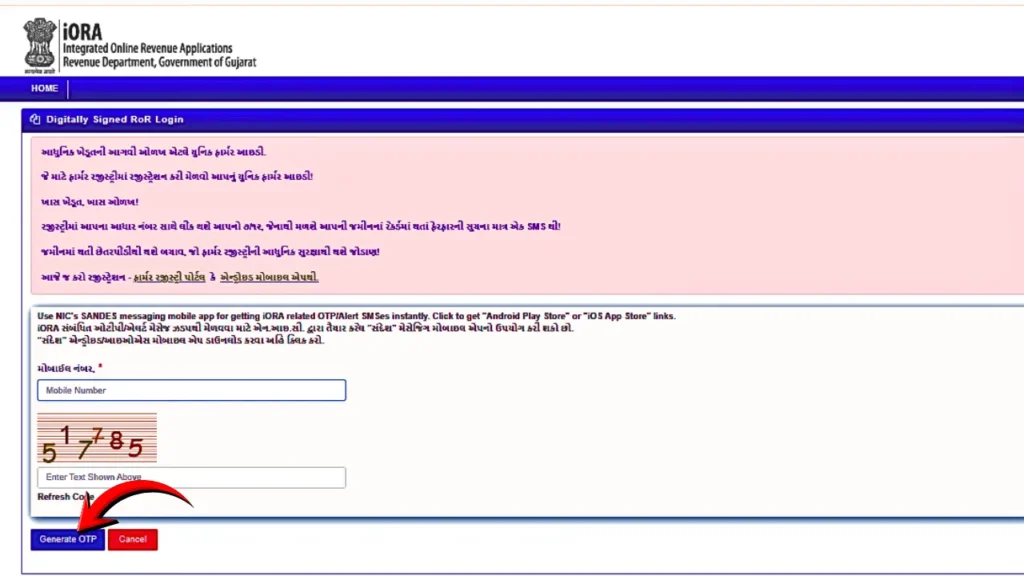
Step 4: Select your land details — District, Taluka, Village, and Survey Number
Step 5: Click the Download option to save your digitally signed RoR document
Where you can use this document:
- Bank loan applications (agricultural and home loans)
- Property registration and sale deed execution
- Court submissions as evidence of ownership
- Government subsidy applications
- Inheritance and mutation proceedings
How Government Users Login (SSOI Access)
- Visit the official website: https://anyror.gujarat.gov.in/
- Select “Office Login (SSOI)” from the homepage to allow authorized government officials to securely access the revenue administration dashboard and manage land record services.

- Enter your assigned username and password.
- Complete the captcha verification.
- Click on Login to access the dashboard.
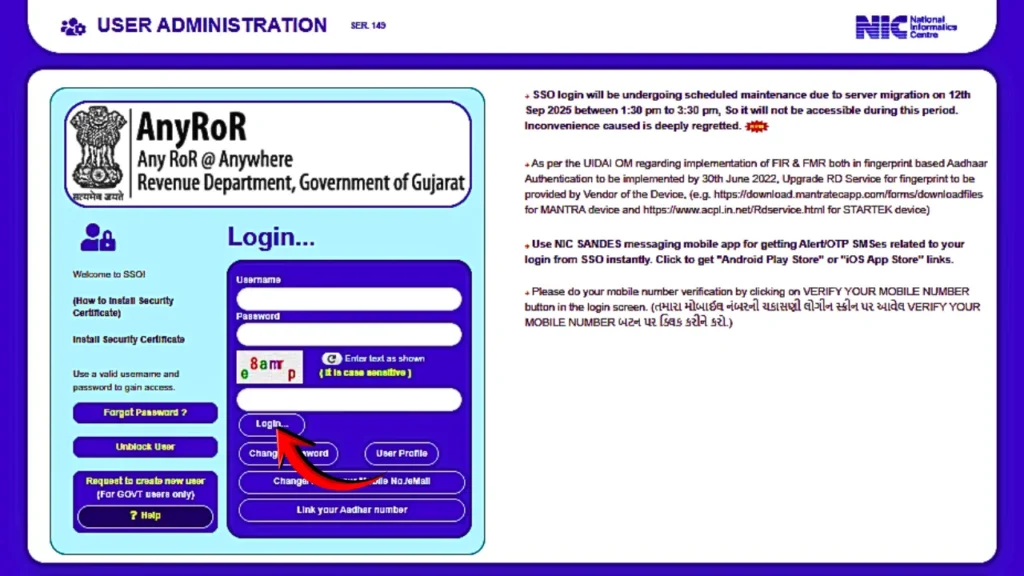
This login is only for authorized government staff of the Revenue Department. Through SSOI access, officials can:
- Approve or update mutation entries
- Manage land record data
- Reset passwords and unblock accounts
- Handle administrative and revenue-related tasks
This section is not meant for public users and requires official credentials.
How to Search Registered Property Records (IGR Property Search)
If you want to check a property’s registration history — past sale deeds, ownership transfers, and document numbers — AnyRoR provides an IGR (Inspector General of Registration) property search tool.
- Step 1: Visit anyror.gujarat.gov.in and click “Property Search”

- Step 2: Choose your search method:
- Property Wise Search — search by survey number or plot details
- Name Wise Search — search using the owner’s name
- Document Number Search — if you have the registration document number
- Step 3: Enter the required details and click “Send Verification”

- Step 4: Enter the OTP received on your mobile number
- Step 5: Click “Search” to view the registration details
This tool is very helpful before buying any property in Gujarat. It shows you the complete history of who owned the property, when it was registered, and what the document numbers are. You can even download scanned copies of registered sale deeds when available.
To download your digitally signed Record of Rights (RoR), visit the official AnyRoR Gujarat portal and complete the OTP verification process. For a complete walkthrough of the portal and its features, read our IORA Gujarat Online guide.
AnyROR Village Map with Survey Number
Many people search for village maps on AnyROR because the portal also gives you access to survey maps showing exact plot boundaries.
To view a village map with survey numbers:
- Go to the Rural Land Records section
- Select your district, taluka, and village
- Look for the Naksha (map) option or survey map view
The map shows plot boundaries, survey numbers, and land boundaries as recorded by the Revenue Department. This is very useful for verifying land area before a purchase or when there is a boundary dispute with a neighbor.
AnyRoR Gujarat Districts — All 33 Districts Covered
The portal covers every district in Gujarat without exception:
| Ahmedabad | Amreli | Anand | Aravalli |
|---|
| Banaskantha | Bharuch | Bhavnagar | Botad |
| Chhota Udaipur | Dahod | Dang | Devbhoomi Dwarka |
| Gandhinagar | Gir Somnath | Jamnagar | Junagadh |
| Kheda | Kutch | Mahisagar | Mehsana |
| Morbi | Narmada | Navsari | Panchmahal |
| Patan | Porbandar | Rajkot | Sabarkantha |
| Surat | Surendranagar | Tapi | Vadodara |
| Valsad |
Whether your land is in a remote village in Kutch or an apartment in Ahmedabad, you access it through the same portal using the exact same steps.
Common Problems on AnyROR — And How to Fix Them
Portal not loading or showing error: The AnyROR portal occasionally has server-side slowdowns, especially during peak hours. Try again after 10–15 minutes, or try a different browser. Chrome works most reliably.
“No record found” message: Double-check your district, taluka, and village selection. A common mistake is selecting the wrong taluka for a village — some village names repeat across talukas. Verify the exact taluka from your old documents or from a local Talati office.
Can’t find survey number: If you don’t know the survey number, use the Owner Name search option. Enter the khatedaar’s name as it appears on older documents.
Captcha not working: Refresh the captcha using the refresh icon next to it. If it keeps failing, try clearing your browser cache or switching to incognito mode.
Record shows old owner name: This usually means a mutation (name change in land records after a sale, inheritance, or gift) is still pending. Check the VF-6 mutation entries to see the current status.
Final Words
The AnyROR Gujarat portal did not just move land records online. It removed an entire system of delays, middlemen, and unnecessary stress that Gujarat landowners dealt with for decades.
Today a farmer checks his 7/12 Utara for a loan without leaving his field. A buyer verifies property ownership before paying any advance — sitting in the seller’s drawing room, on his phone. A family confirms ancestral land details during an inheritance discussion without anyone traveling anywhere.
The portal is free. It covers all 33 districts. It works 24 hours a day. And every record you see is the same record sitting in the official government database.
Before you buy land, check it. Before you sell, check it. Before you sign anything related to property in Gujarat — open AnyROR first. Three minutes now can save you from a mistake that takes years and lakhs of rupees to fix.